
Analytics
Track how your organisation is using Annature with reports on envelopes and text messages over time, broken down by account, group, and status.
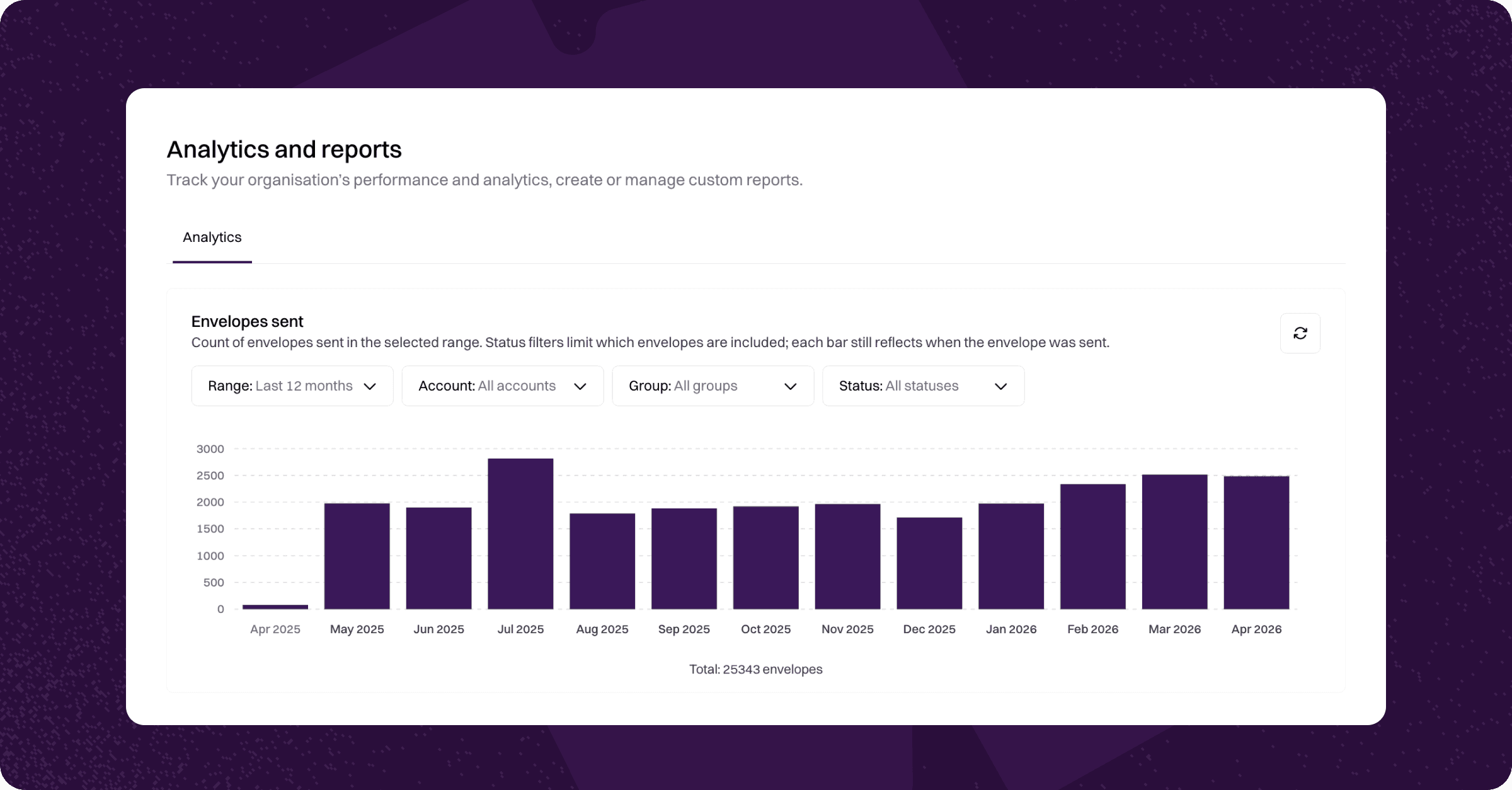
Analytics gives you a single place to see how your organisation is using Annature. You can view how many envelopes and text messages have been sent over any period, filter by account, group, or status, and spot trends without having to dig through individual envelopes.
Analytics is available to Administrators only.
Accessing Analytics
To access Analytics:
Log in to your Annature account.
From the left sidebar, click Analytics.
You'll land on the Analytics page, which shows three reports stacked vertically: Envelopes sent, Envelopes by status, and Text messages sent.
Envelopes sent
The Envelopes sent report shows the number of envelopes sent each day within your selected range. Each bar represents the date the envelope was sent.
You can filter this report by:
Range — the time period to display.
Account — a specific account in your organisation.
Group — a specific group in your organisation.
Status — show only envelopes that are currently In progress, Completed, or Voided.
Notes: Status filters limit which envelopes are included in the count, but each bar still reflects the date the envelope was originally sent — not the date its status changed.
Envelopes by status
The Envelopes by status report groups envelopes by the day they were sent and breaks each bar down by current status:
In progress
Completed
Voided
This view is useful for understanding the mix of envelope statuses on any given day at a glance — for example, how many envelopes you sent on a particular day that are still awaiting signing.
The same filters apply: Range, Account, Group, and Status.
Text messages sent
The Text messages sent report shows the number of SMS notifications sent within your selected range. This includes all SMS notifications sent across your organisation.
This report can be filtered by Range only.
Filters
Each report at the top of the page uses the following filters:
Range — quick presets including Today, Yesterday, Last 7 days, Last 4 weeks, Last 6 months, Last 12 months, Month to date, Year to date, and All time. You can also pick a custom start and end date from the date picker.
Account — filter results to a specific Annature account in your organisation.
Group — filter results to a specific group.
Status — filter envelopes by their current status: In progress, Completed, or Voided.
Filters apply to each report independently, so you can compare different views side by side.
Refreshing reports
Each report has a refresh icon in the top-right corner. Click it to reload the data with your current filters applied.
Related articles
Was this helpful?