
Annature changelog
Text previews when Preparing an envelope
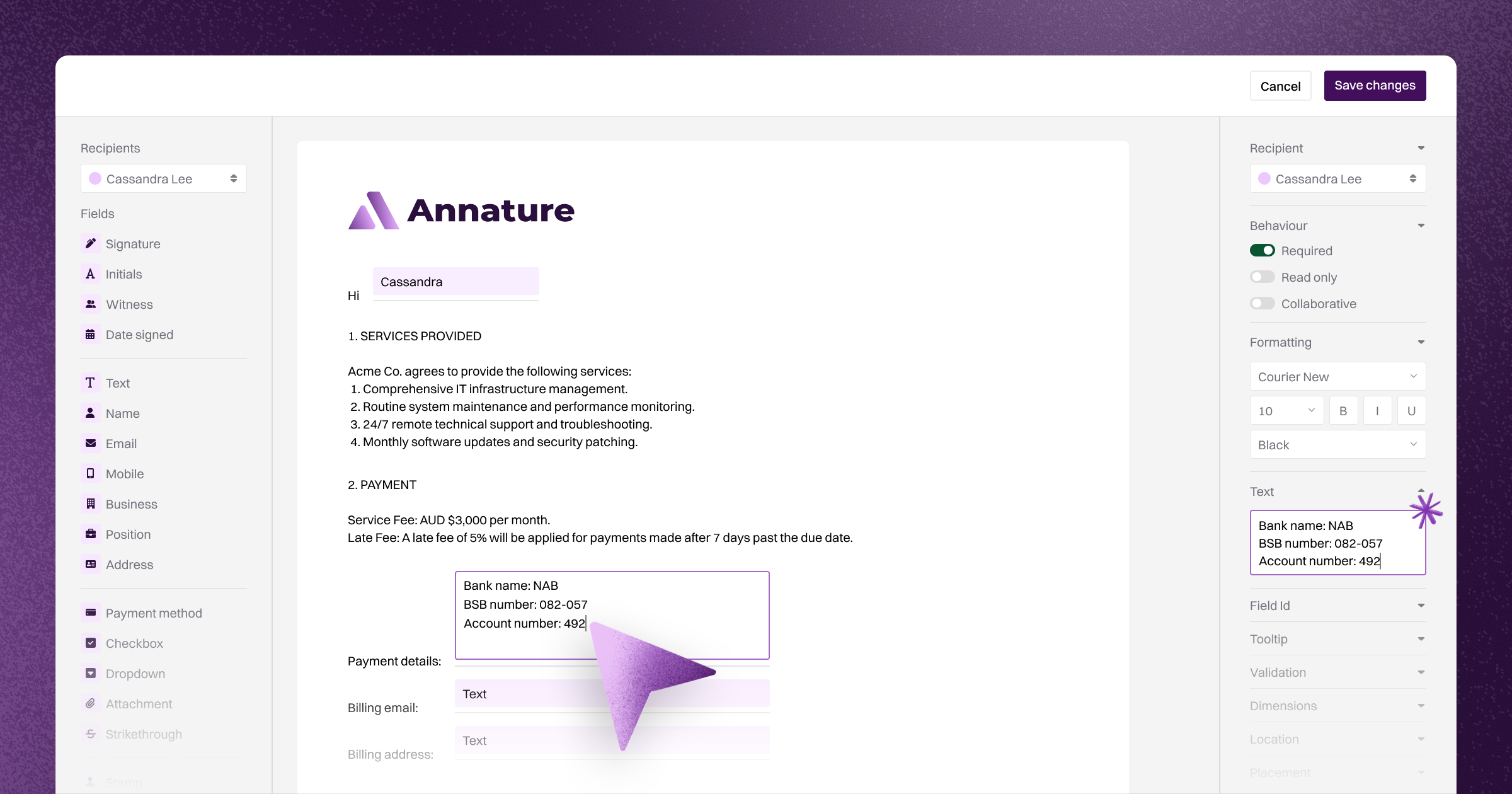
When you place a text field on a document and give it starting text, you can now see that text on the page as you type it. Where the text starts, where it finishes, and how it sits in the field are all visible while you prepare the envelope, so you can adjust the field’s positioning before you hit send.
This works for text fields, and for the other fields that take starting text: name, email, mobile, business, position, and address. Text and address fields wrap onto new lines as the text grows. The single-line fields stay on one line.
I’m very happy to be shipping this feature out this morning, for us this marks the longest-running feature request in our backlog done, finally.
If you find anything not working the way it should - let us know.
— Corey
AML & CTF Custom fields — XPM and FYI Elite cont.
A few weeks ago, we published a changelog proposing a set of AML & CTF custom fields for our Xero Practice Manager and FYI Elite integrations, and asked for your feedback. Thanks to everyone who upvoted, commented, and pushed back — the field set is now finalised and live in production.
The finalised custom fields
The seven AML & CTF custom fields we proposed have shipped as planned:
Field | Description |
|---|---|
[A] AML & CTF Checked | Whether AML & CTF screening has been run for this client |
[A] AML & CTF Date | The date AML & CTF screening was most recently run |
[A] AML & CTF Outcome | The result of the screening check — Pass or Flagged |
[A] AML & CTF Outcome Notes | Details of any matches identified during screening (e.g. PEP, sanctions, adverse media) |
[A] AML & CTF PEP | Whether the client has been identified as a Politically Exposed Person, including PEP level |
[A] AML & CTF Risk Assessment | Whether a risk assessment has been completed and recorded for this client |
[A] AML & CTF Risk Rating | The client's assigned risk rating — Low, Medium, or High |
All new custom fields are prefixed with [A] to make them easy to identify as Annature-managed fields in your practice management system. To keep everything visually consistent, we've also renamed the existing verification custom fields to use the same [A] prefix.
What you need to do
To pick up the new fields and the renamed existing fields, your organisation owner needs to reconnect the integration. Head to Settings → Integrations and click Reconnect on the Xero Practice Manager or FYI Elite integration tile.
This is a one-time step. Once reconnected, the new fields will populate as verifications and screening checks are completed.
New visibility over what's synced
Alongside the custom fields update, we've added new UI to give you clearer visibility over which verification requests have been connected to a client in your practice management system, and the status of what's been synced.
On the identity verification dashboard, you'll now see an icon next to each request indicating whether it's connected to a client record. Open a connected request and you'll see the current sync status for both the custom fields and the documents that have been synced across — with the ability to resync anything that's out of sync or that failed to sync initially.
Connecting historical verifications
If you've been using Annature for a while but have only recently connected your practice management system — or if you've sent verifications outside your normal client onboarding flow — you can now retroactively connect those verifications to a client record.
Open any verification request from the triple dots menu, click Connect to Integration, search for the relevant client, and Annature will immediately create the link and sync the custom fields and documents across.
This is a housekeeping feature — the aim is to get all of your historical verification data captured in your practice management system so your client records reflect the complete picture.
Any questions, hit the chat button in the bottom-right of the app.
— Corey
AML & CTF Custom fields — XPM and FYI Elite

During our AML/CTF webinar series earlier this month, we ran a poll asking whether we should design our own custom fields to record AML/CTF status back into Xero Practice Manager and FYI Elite, or wait until these vendors themselves released a structured scheme for this data. The overwhelming majority of you asked us to move ahead now rather than wait.
Based on that feedback, we’ve drafted a set of custom fields that Annature will sync back into your Xero Practice Manager & FYI Elite client records. Before we start building the integration, we want to share what we’ve come up with and get your input - because you’re the ones who’ll be looking at these fields every day.
What we’re proposing to sync
The Verification fields already exist and are being used today. What's new are the AML & CTF fields. All fields are prefixed with [A] to make them easy to identify as Annature-synced fields in XPM.
Field | Description |
|---|---|
[A] AML & CTF Checked | Whether AML & CTF screening has been run for this client |
[A] AML & CTF Date | The date AML & CTF screening was most recently run |
[A] AML & CTF Outcome | The result of the screening check — Pass or Flagged |
[A] AML & CTF Outcome Notes | Details of any matches identified during screening (e.g. PEP, sanctions, adverse media) |
[A] AML & CTF PEP | Whether the client has been identified as a Politically Exposed Person, including PEP level |
[A] AML & CTF Risk Assessment | Whether a risk assessment has been completed and recorded for this client |
[A] AML & CTF Risk Rating | The client's assigned risk rating — Low, Medium, or High |
[A] Verified | Whether the client has been successfully identity-verified through Annature |
[A] Verified By | The Annature user who initiated the verification request |
[A] Verified Date | The date the verification was completed |
[A] Verification Method | The method used to verify the client's identity (e.g. Document Check) |
[A] Verification Notes | Notes recorded against the verification (e.g. Verified by Annature) |
[A] Verification Link | A direct link to the verification record in Annature |
A few things to know about the field names
The [A] prefix is new. Existing verification fields on your XPM connection don't have it, and we're not changing those — automations and reporting rules built on the current field names will keep working as they do today.
Going forward, the [A] prefix is the default for any new custom field we create — including the AML & CTF fields when you create them. If you'd rather not use the prefix, you can turn it off in your integration settings before creating the new fields. New connections created after this build will have the prefix on by default.
You can rename any of these fields in XPM to whatever suits your firm. When our integration creates a field in XPM, we store an internal ID against it — meaning we always know which field is which, regardless of what you rename it to. If you'd prefer "Client PEP status" over "[A] AML & CTF PEP", rename it. If your team has an internal naming convention, use it. We won't lose track of the field, and syncing will keep working exactly as expected.
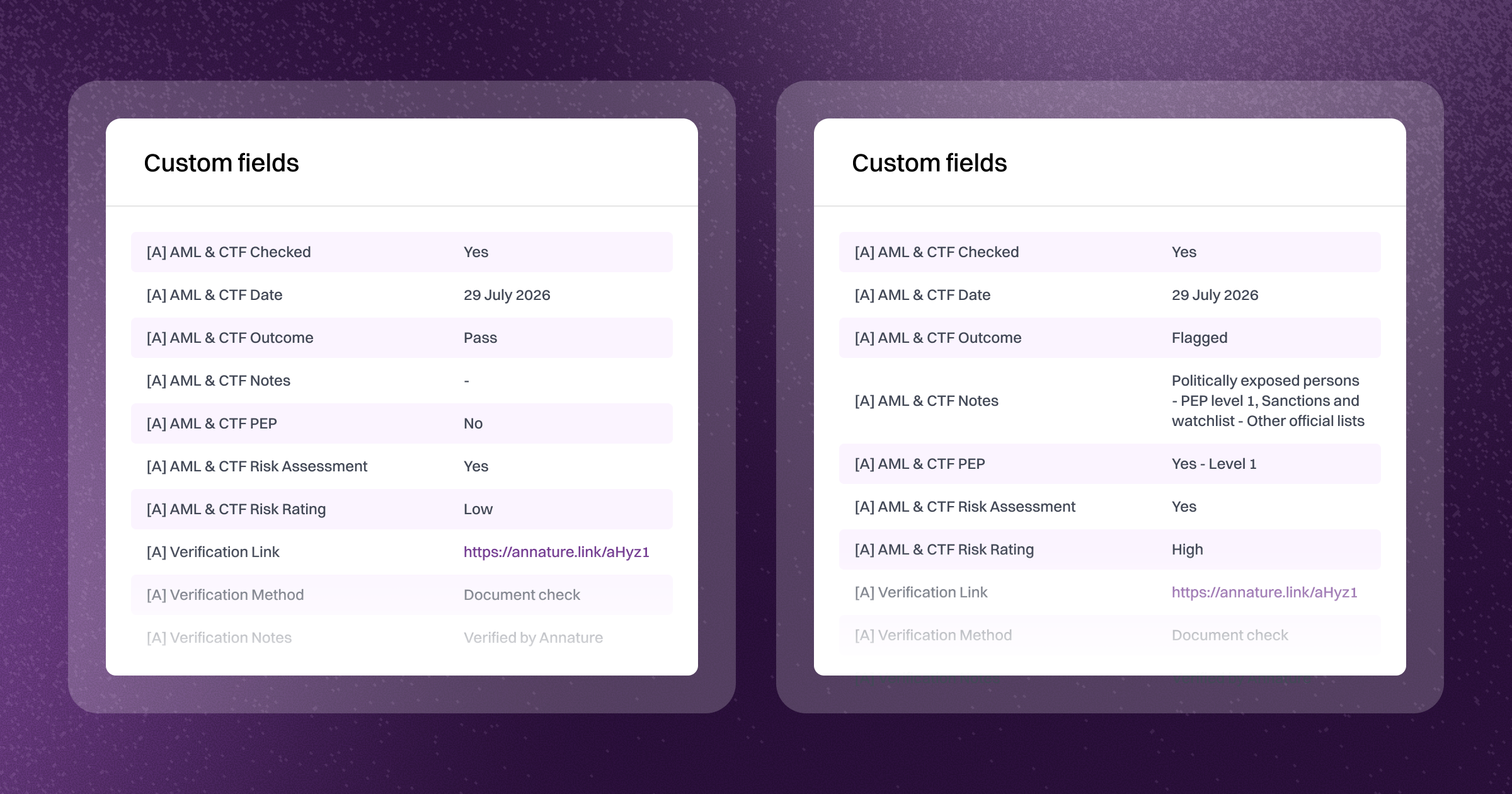
To make this concrete, here's how the fields would appear on a client record — a clean pass on the left, and a flagged result on the right:
We want your feedback
Before we start building, we want to know what you think of the proposed fields — and whether we're missing anything.
Head over to our Feature Requests page and you'll find AML & CTF Custom Fields.
Upvote if the proposed field set looks right to you, or leave a comment if you'd like to see something added, removed, or reworked. The specific questions we're keen to hear on:
Are there fields here that don't make sense to you, or that you wouldn't use?
Are there fields missing that you'd want to see synced?
For the "Outcome Notes" field on flagged results — is the format we're showing useful, or would you prefer something more structured?
We'll be collecting feedback until 07 August before making a decision and starting the build.
— Corey
Identity verification — now in transitional period
As of today, new verifications can no longer be sent from the old identity verification dashboard. All new verifications must now be created from Identity Verification 2.0, which you'll find in the left-hand navigation.
Existing in-progress and completed verifications can still be viewed in the old dashboard for the rest of this week. At the end of the week, everything will be migrated across to 2.0, and any verifications still in progress at that point will be cancelled automatically — if they're still required, you'll need to resend them from 2.0.
I’ve recorded a short walkthrough covering everything that’s changed, why the AML & CTF screening check is now on by default, and the new features available in 2.0. It’s worth a watch if you use Identity verification regularly.
Any questions, hit the chat in the bottom-right of the app.
Identity verification 2.0 — Built for AML & CTF
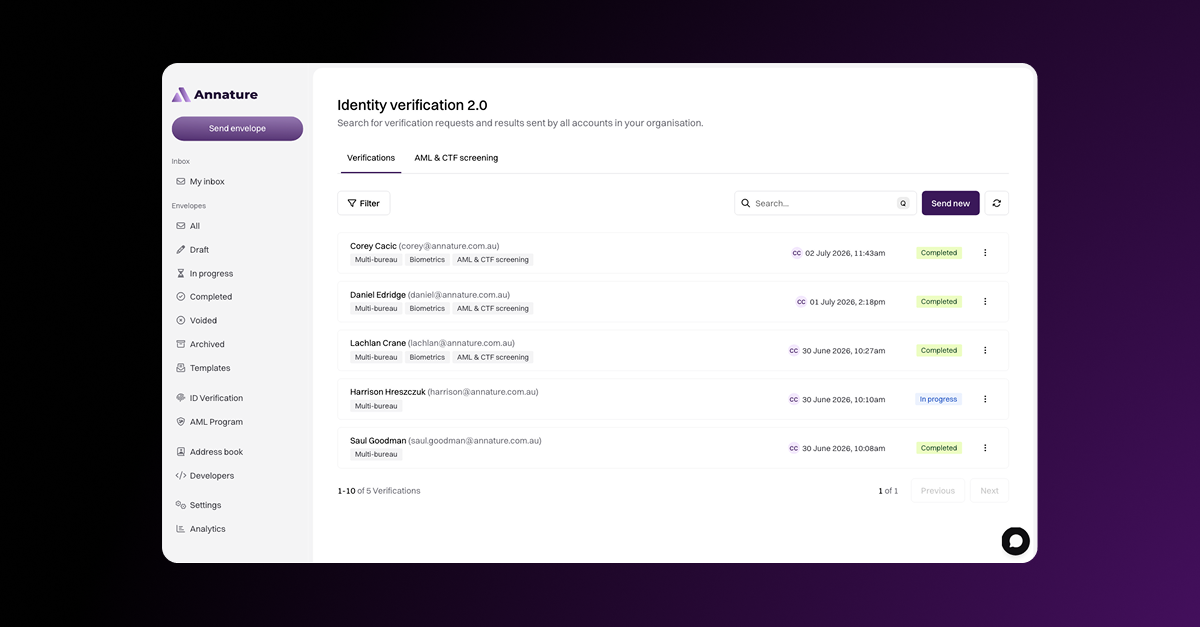
Today we're releasing Identity verification 2.0 — the biggest update to our identity verification product since we launched it in 2022. This release introduces a new dashboard, a new billing structure, standalone AML & CTF screening, and a set of feature improvements many of you have been asking for.
This is a long post, but if you use identity verification in Annature, it's worth reading the whole thing — there's important information in every section.
Before I get into the detail, two important things to know up front:
If you're not a reporting entity under Tranche 2 obligations, most of what's changed doesn't apply to you. You get a new interface, some new features, and a cleaner billing line — but the way you send verifications and the way they work is mostly unchanged.
The pricing hasn’t gone up. The billing structure has changed to reflect the new product, but the total cost of a full verification with AML & CTF screening is the same as it was before. More detail below.
Walk through these changes live
I’m running two webinars next week covering everything in this post and the rest of the AML & CTF module. Same content each session — pick whichever works for you:
Wednesday 8 July, 11:00am AEST — Register here
Thursday 9 July, 2:00pm AEST — Register here
If you can't make either session, register for the recording — here — and we'll send it out once the live sessions have wrapped up.
Billing changes
Currently when you're subscribed to Identity verification, your invoices show two line items — Standard verifications and Enhanced verifications. Enhanced was everything included in Standard, plus the AML & CTF screening check.
Your next invoice will instead show:
Identity verifications — the equivalent of what was Standard
AML & CTF screening — the equivalent of what was previously bundled into Enhanced
So if you were previously sending 10 Enhanced verifications, your invoice would have shown Standard verifications: 0 and Enhanced verification: 10. Going forward, that same 10 verifications will show as Identity verifications: 10 and AML & CTF screening checks: 10.
The prices for these line items have adjusted proportionally — you are not being charged more. The total cost is identical to what you were paying before. We've simply separated the two components so they can be billed independently, which matters because...
AML & CTF screening now runs independently. Previously, AML & CTF screening was only available bundled with a verification. Now you can run standalone AML & CTF screening checks without doing a full identity verification, which is the right approach for many reporting entity workflows — particularly bulk-screening your existing client base. More on this further down.
Identity verification 2.0
Identity verification 2.0 launches today as a BETA. You'll see a new menu item in your navigation bar that takes you into it.
Right now, the old product and 2.0 are separate. Verifications you send from the old product won't appear in 2.0, and vice versa. This is deliberate for the transition period — data from each is kept isolated until the migration.
On 13 July, all data from the old product will be migrated into 2.0. From that point, the old product closes, and everything lives in 2.0.
Any verifications still in progress on 13 July will be cancelled during the migration and will appear as cancelled in 2.0. To avoid this, we recommend sending all new verifications from 2.0 during this interim period.
We strongly recommend you start sending all new verifications through 2.0 from today. This gives your in-progress verifications from the old product a week and a half to be completed before the 13 July migration.
Our data shows verifications are typically completed within 1-2 business days, so a week and a half is plenty of time for anything already in flight to finish before it’s affected.
What's new in 2.0
We've used this opportunity to ship a set of improvements many of you have requested.
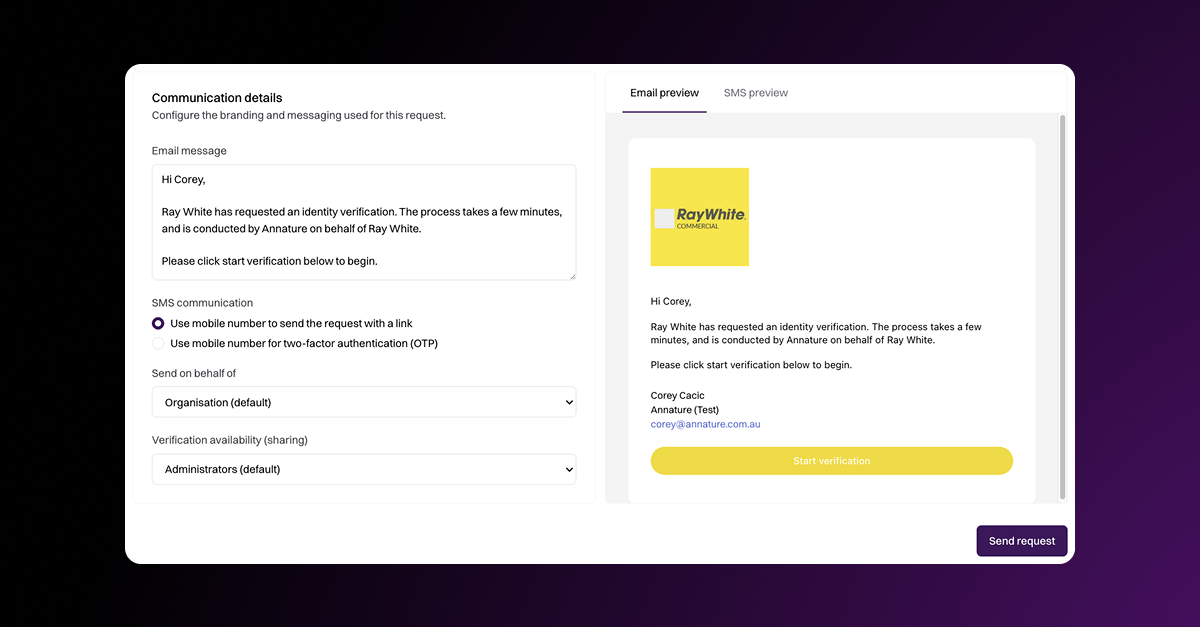
SMS with verification link. Previously, mobile numbers on a verification were only used for two-factor authentication, which meant the customer had to start from their email. When you enter a mobile number now, the default is to send an SMS containing the verification link — the same behaviour you get with envelopes. The customer can start from the SMS directly. If you'd rather use the mobile number for OTP as before, that option is still available.
Two-factor authentication on verifications served limited purpose anyway — a verification request is an empty form, not a document containing information that needs protecting. The link-first approach reflects how customers actually complete these requests, which is from their mobile phone.
Biometrics and AML & CTF screening are now on by default. The majority of our customers using the identity verification product are reporting entities, which means biometrics and AML & CTF screening are the sensible defaults. You now need to opt out of these if they don't apply to your use case.
Email and SMS customisation. You can now personalise the email and SMS messages sent when you create a verification, in the same way you customise messages when sending an envelope. Add a note, a personal introduction, or context specific to your client — helpful for reducing the "is this legitimate?" hesitation some recipients have with automated verification requests.
Availability (formerly Sharing). We've made a small change to how verifications are shared across organisations and groups. Sharing is now called Availability. If your organisation uses groups, the way verifications are sent from the organisation level versus from a specific group has been refined. The change is small but worth being aware of.
New required fields
Two new required fields for all verifications sent from 2.0:
Country of birth
Nationality or citizenship
Along with the existing required fields (full name, date of birth, address), these help sharpen AML & CTF screening results. When a screening check returns potential matches, the additional data narrows the results and helps build a more complete KYC profile of the customer.
If you're using Annature purely for identity verification without AML & CTF screening, these fields are still captured — the data doesn't cost you anything to collect and it's useful information to have on file.
Reviewing AML & CTF screening matches
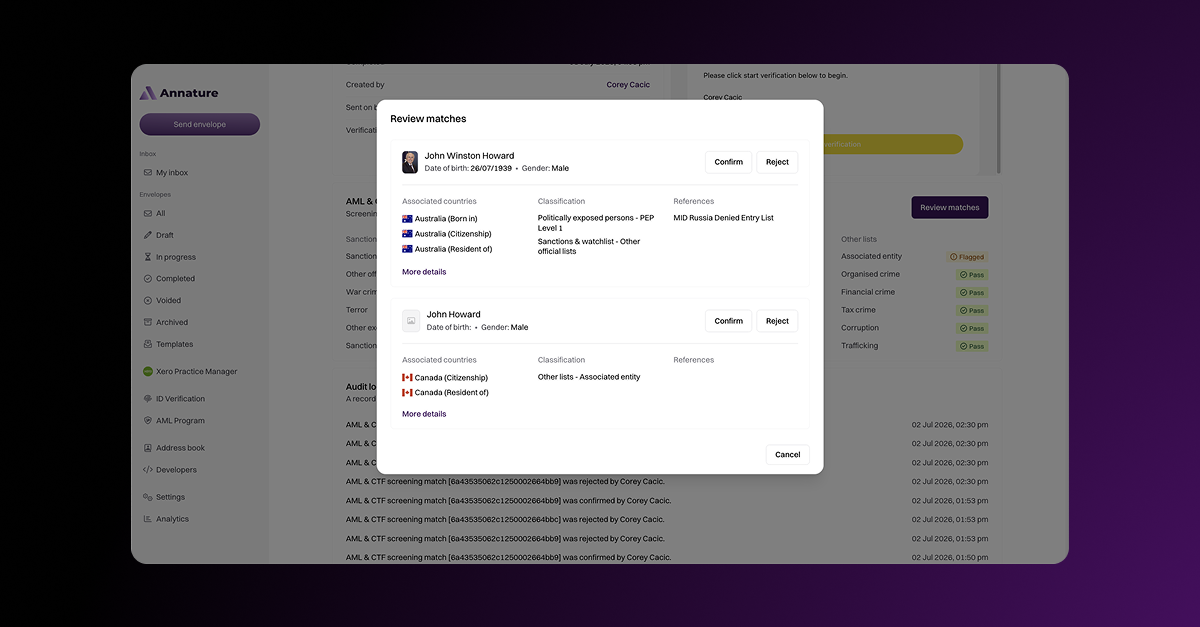
When an AML & CTF screening check returns results, you'll be shown the list of potential matches — individuals who share attributes (name, date of birth, country of origin, etc.) with the person you're screening. You can review each match individually and use your professional judgement to determine whether the match refers to the person you're actually engaging with.
An important thing to remember: AML & CTF screening checks often return matches by their nature. This is essentially the automated equivalent of an internet search — reviewing results to see which, if any, refer to the person you're actually working with — which AUSTRAC's own guidance endorses as a valid method for background and PEP checks.
There will be results. Your job is to use the information you've collected about the customer against the information shown in the match to make an assessment. In the vast majority of cases, potential matches will be false positives — the tool has done its job by surfacing them; you do yours by clearing them.
Standalone AML & CTF screening
We'll be covering this in more depth during our webinars next week, but the headline is:
For existing clients, you generally don't need to run a full identity verification. Reporting entities are expected to take a risk-based approach to CDD for existing clients. In most cases, this means running standalone AML & CTF screening to establish a baseline for each client and enrol them in ongoing monitoring — without needing to redo full identity verification for clients you've worked with for years.
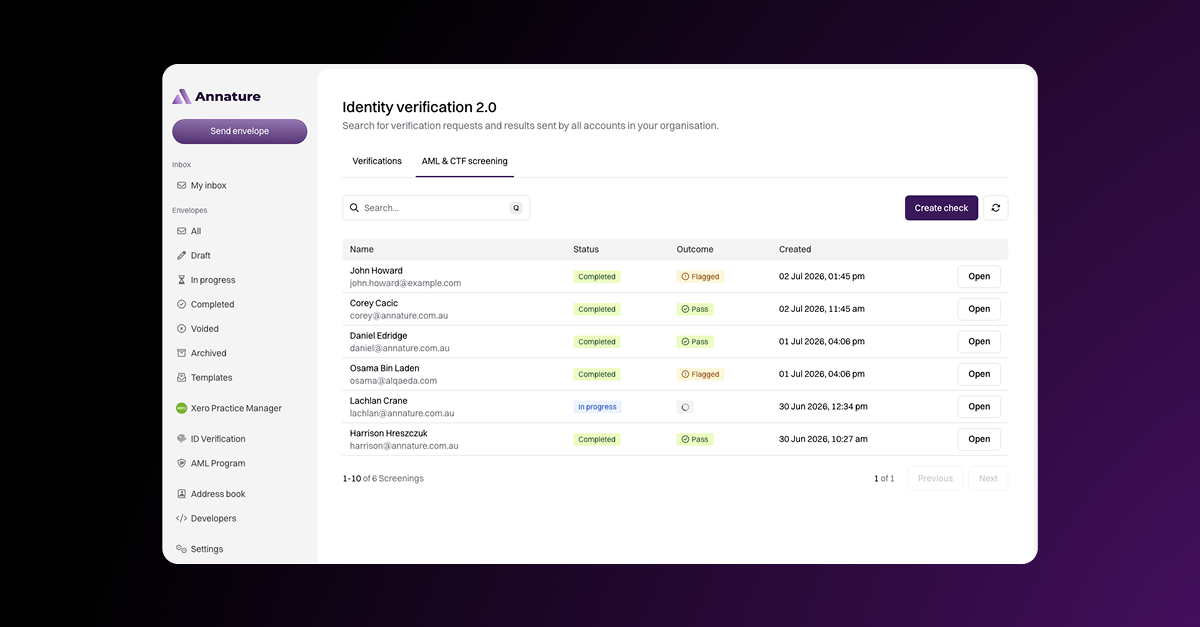
Standalone AML & CTF screening is now available as its own tab in 2.0. You'll also see all screening checks run as part of a full verification appearing in this same view, so you have a single place to review all your AML & CTF screening activity.
Ongoing monitoring — free of charge
One thing worth calling out: ongoing monitoring at Annature is free.
We've watched the industry over the last twelve months, with new AML compliance apps appearing regularly, most of them charging per client per month for ongoing monitoring. It's ridiculous pricing that adds significant recurring cost for a service that should just be part of doing the job properly.
When you run an AML & CTF screening check at Annature, ongoing monitoring is enabled by default and it is free for the next 10 years. We'd say forever, but forever is a long time.
AML/CTF - Internal risk assessments
The next module of our AML/CTF tooling is now live. You can generate a tailored ML/TF risk assessment for your firm — the diagnostic document that sits alongside your AML/CTF Program and describes the money laundering and terrorism financing risks your firm is exposed to.
Generating a risk assessment in Annature takes a handful of short questions about your firm — your client base, your geographic exposure, how you typically engage with clients. From there, the document is produced and stored against your program, with the same review cadence prompts and audit trail as your other AML documents.
I've recorded a short walkthrough showing how to generate your risk assessment, what the document looks like, and how to make changes if your judgement differs from what Annature produces. Have a watch below.
Coming up next: a major update to our Identity verification product. New dashboard, a redesigned verification request flow, and bulk enrolment of established clients into ongoing AML monitoring — including how this connects with your practice management systems like Xero Practice Manager, FYI Elite and Kloud Connect.
As always, if you have feedback or questions, hit the chat button in the bottom-right of the app.
— Corey
AML/CTF - Program documents & Training

The first module of our AML/CTF tooling is now live. You can generate a tailored AML/CTF Program for your firm, along with the two supporting procedure documents that sit alongside it — your Risk assessment procedure and your Identity verification and AML screening procedure. If you'd rather use program documents you've prepared elsewhere, you can upload those instead.
Alongside the documents, you'll find the participant training workflow. Add your staff, send them the program for review, and Annature records each acknowledgement against their record. Your dashboard gives you a live view of training status across the firm, and the system prompts staff when refresher training is due or when a material change requires re-acknowledgement.
Built-in review cadences keep the program itself on schedule. When your AML/CTF Program is due for review, the Compliance Officer is prompted — and every action, version change, and acknowledgement is captured in the audit log.
I've recorded a short walkthrough showing how to generate your program documents, configure training, and use the dashboard. Have a watch below.
This is the first module in our AML/CTF release. Coming up next: building your firm's ML/TF Risk Assessment — the diagnostic document that complements your AML/CTF Program and sets out your firm's specific money laundering and terrorism financing risk profile.
As always, if you have feedback or questions, hit the chat button in the bottom-right of the app.
— Corey
Word to PDF conversion restored
Word document to PDF conversion is back up and working normally.
The Microsoft Word Online service is still down, however we’ve implemented a backup conversion service in the interim which is currently handling 100% of conversions. You should experience no further disruption while we wait for Microsoft to restore their service.
We'll monitor Word document conversions throughout the rest of the day, and may even consider making this new backup conversion service our primary if we observe better stability.