
Reviewing a completed AML & CTF screening
Review the outcome of an AML & CTF screening check, work through any potential matches, and clear or confirm them using your professional judgement.
Once an AML & CTF screening check completes, you'll find it in the AML & CTF screening tab in Identity verification 2.0. This is where you review outcomes across sanctions, PEP, adverse media, and other lists — and, when the check has flagged potential matches, review them individually.
This view is used for both standalone AML & CTF screening checks and the AML & CTF screening component of a full identity verification.
Opening a screening
From the AML & CTF screening tab, click Open next to the check you want to review.
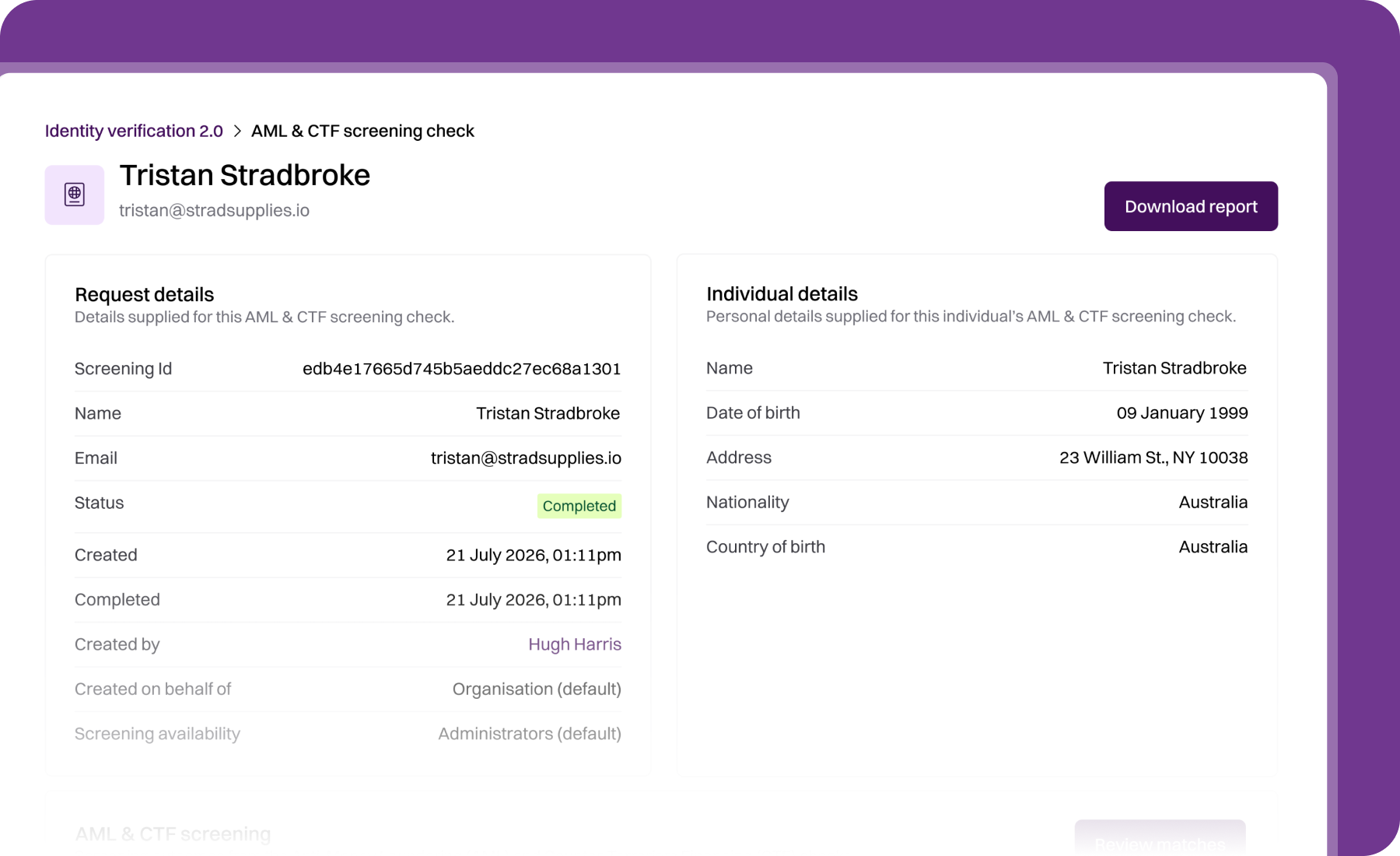
At the top of the detail view you'll see the individual's name, email, and a Download report action. Clicking Download report gives you a PDF version of the extensive AML screening report — the same detailed results shown in your Annature dashboard, formatted as a PDF for record-keeping and audit purposes.
If the screening is linked to a client from an integration (for example, Xero Practice Manager), a banner near the top gives you a shortcut to open the client in that platform.
Request details
Displays the information about the check itself:
Screening Id — the unique identifier.
Verification request — if the screening was run as part of a full identity verification, this links back to that verification.
Name and Email address — the individual's details.
Status — In progress or Completed.
Created and Completed — timestamps.
Created by — the team member who created the check.
Created on behalf of — the group or organisation.
Screening availability — who can see and manage the screening.
Individual details
The personal details supplied for the individual, used to sharpen screening results:
Name
Date of birth
Address
Nationality
Country of birth
The more accurate these details, the more precise the screening results.
AML & CTF screening outcomes
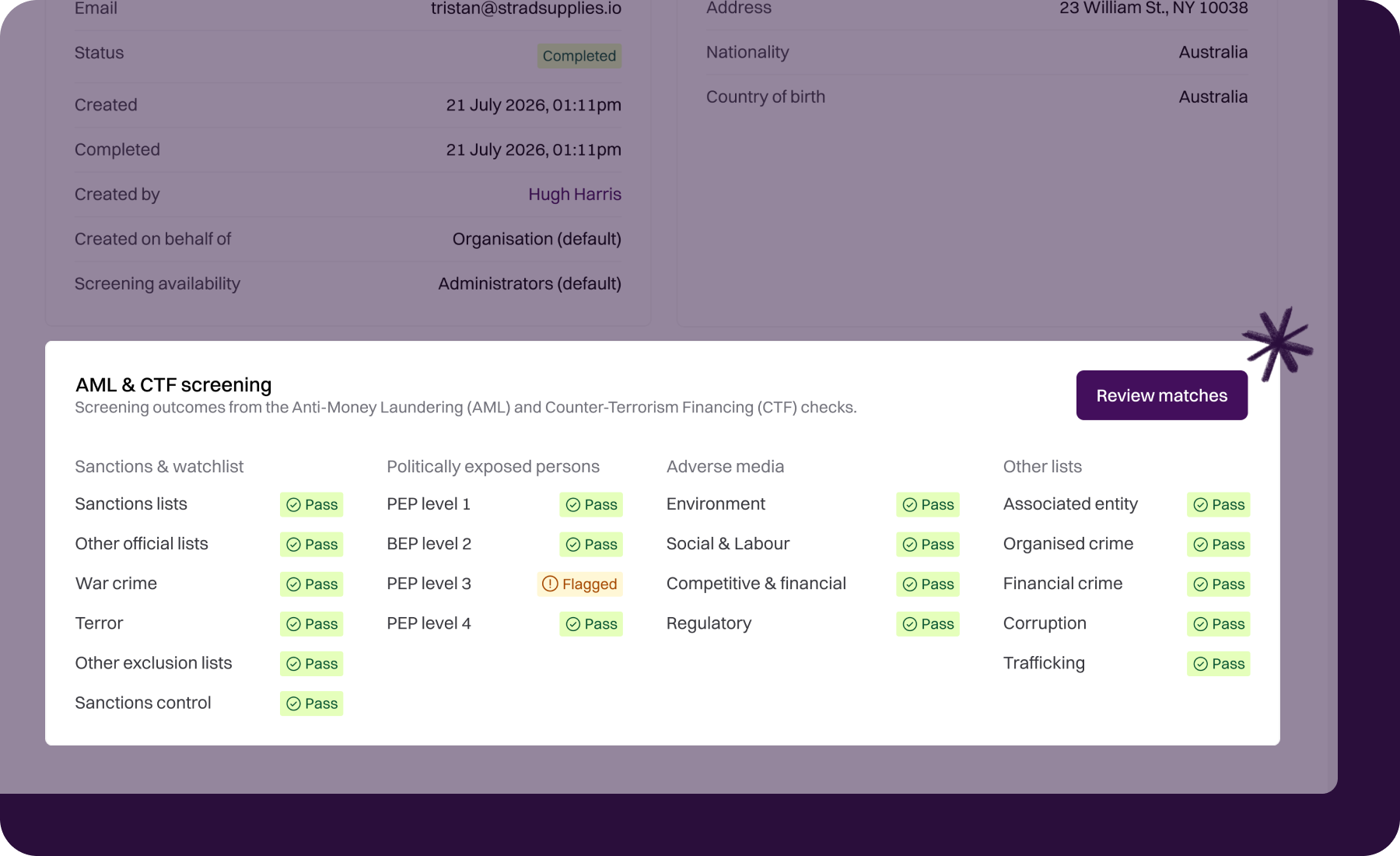
The main body of the review shows screening outcomes across four categories:
Sanctions & watchlist — Sanctions lists, other official lists, war crime, terror, other exclusion lists, sanctions control.
Politically exposed persons — PEP levels 1 through 4.
Adverse media — Environment, social & labour, competitive & financial, regulatory.
Other lists — Associated entity, organised crime, financial crime, tax crime, corruption, trafficking.
Each item shows either Pass (nothing to review) or Flagged (potential matches to review).
Reviewing matches
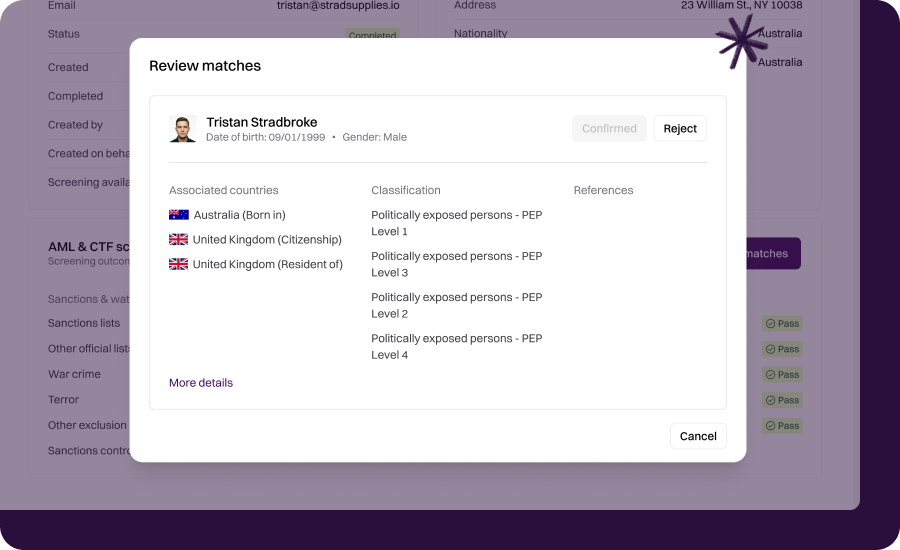
When an item is flagged, the check has surfaced one or more people in the underlying data source who share attributes with the individual you're screening — for example, they have the same name, or a similar date of birth.
Click into a flagged item to see the list of potential matches. For each match, you can review:
Name variants the match is known by.
Date of birth (if available).
Country of origin or nationality.
Source — which list, database, or article the match came from.
Details — the context of why the person appears on the list.
Your job is to use the information you've already collected about your client, and compare it to the information shown in each match, to decide whether that match refers to the person you're actually working with.
An important note about matches
AML & CTF screening checks often return matches — that's the nature of the tool. Screening is essentially the automated equivalent of an internet search: reviewing results to see which, if any, refer to the person you're actually working with. AUSTRAC's own guidance endorses this as a valid method for background and PEP checks.
There will be results. Your job is to clear them. In the vast majority of cases, potential matches are false positives — someone else who happens to share a name or attribute with your client. The tool has done its job by surfacing them; you do yours by working through them and using your professional judgement to determine whether each match refers to your client.
For low-confidence matches (different date of birth, different country, different context), you'll typically clear them quickly. For high-confidence matches (matching name, date of birth, and country), a closer review is warranted, and you may need to seek further information from your client.
Ongoing monitoring
If ongoing monitoring is enabled for this screening (the default), we continue to check the individual against sanctions and PEP lists after the initial screening. If a new match appears in future, you'll be notified automatically and can review it in the same way.
Ongoing monitoring is free for the next 10 years — see Introduction to Identity verification 2.0 for more.
Downloading the report
Click Download report in the top-right to download a PDF of the screening result, including any matches and their details. This report is suitable for record-keeping and audit purposes.
Related articles
Was this helpful?